The MacBook notch as a working tool
Cyclop is a free, open-source notch app for macOS. Invisible at rest; on hover it unfolds into a panel with a player, a file shelf, clipboard history, snippets, your next meeting and an offline translator.
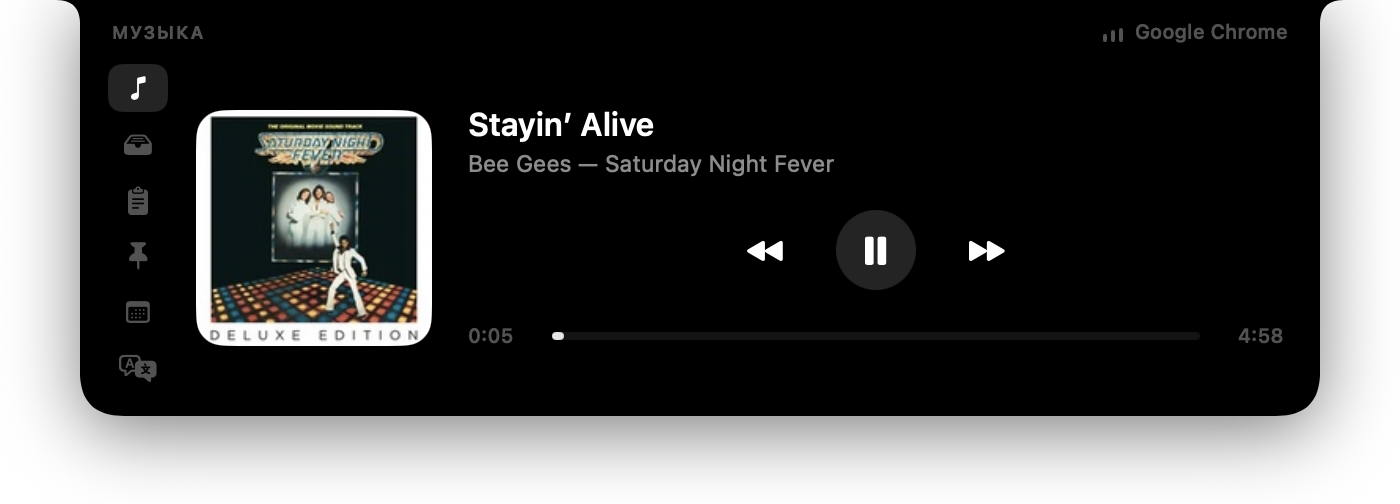
What Cyclop puts in the notch
Eight tabs. Each one runs only while the panel is open — nothing keeps a timer going for a tab nobody is looking at.
Music
Artwork, track, artist and a scrubber that actually seeks. The source is anything macOS itself can see: Apple Music, Spotify, or a video in a browser tab. Nothing to configure in the browser.
Shelf
Drag files into the notch and they wait there. Drag a card out and the file goes wherever it is dropped. ⌘-click selects several and drags them as a group. A screenshot copied to the clipboard is saved and lands here too — including one taken on an iPhone.
Clipboard
The last 40 copies. A click puts an entry back on the clipboard.
Snippets
A hand-kept list of what you are tired of retyping: an address, a phone number, an email. The same list is a plain JSON file you can edit in any editor.
Calendar
The next meeting a week ahead, how long until it starts, and a button that joins the call — Zoom, Meet, Teams and others. Meetings that overlap each get their own join button.
Translate
Type on the left, the translation appears on the right — offline, using macOS's own translation, with no service and no account. English to Russian and back; the direction is taken from the script the text is written in.
Teleprompter
A script that scrolls under the camera at a speed you set. The notch is the one place on the screen a teleprompter belongs: the eyes stay on the lens instead of travelling to a window below it.
Notes
Scratch space. Hovering lands with the caret ready; blank notes sweep themselves out.
How Cyclop is different
The notch category is crowded. These are the things Cyclop is measured on, all of them checkable in the source.
| Zero dependencies | Nothing but Swift, SwiftUI and AppKit. No package manager, no vendored frameworks. The whole thing is 5 800 lines you can read in an afternoon. |
|---|---|
| No permissions | No Automation, no Accessibility, no Screen Recording. Calendar access is the only permission Cyclop ever requests, it belongs to one tab, and the system dialog appears on an explicit button press rather than at launch. |
| Any media source | Now Playing is read from macOS itself, so a video in a browser tab works exactly like a music player — no browser extension, no per-app connector. |
| Offline translation | Translation runs on the device through macOS's own framework. No API key, no account, nothing leaves the machine. |
| Nothing collected | No telemetry, no analytics, no crash reporting. The single outgoing request in the whole app is an optional artwork lookup for Spotify tracks. |
| Actually small | 2.1 MB on disk, around 40 MB of memory, 0.0 % CPU while the panel is closed. |
Install
- Download the latest
.dmgfrom the releases page, open it and drag Cyclop into Applications. - The first launch will not work — macOS will say the app cannot be verified. That is expected: the image is ad-hoc signed, without an Apple Developer ID, and is not notarised.
- Allow it once in System Settings → Privacy & Security → “Open Anyway”. After that it opens normally, and updates do not ask again.
- Or build it yourself — the whole thing is one command, and no Xcode project is involved:
git clone https://github.com/akalikbergenov/cyclop.git
cd cyclop && ./Scripts/bundle.sh release
Questions
Does Cyclop work on a MacBook without a notch?
Yes. On a Mac without a physical cutout Cyclop draws a synthetic notch exactly as tall as the menu bar and behaves the same way. It works on external displays too.
What permissions does Cyclop need?
None until you open the Calendar tab, and that one is asked for by an explicit button press on a screen that explains why — not at launch, and not when the tab opens. Cyclop requests no Automation, no Accessibility and no Screen Recording.
*One exception: a file placed on the shelf from Downloads, Documents or the Desktop is something macOS asks about separately, and only at the moment the shelf is opened.
Is Cyclop free? Is there a paid version?
Free, MIT-licensed, and there is no paid tier. No subscription, no ads, no accounts, and nothing is collected.
Which players does it control?
Anything macOS itself can see. Apple Music and Spotify work, and so does audio or video in a browser tab — YouTube included. Nothing has to be installed in the browser.
Does it send anything anywhere?
No telemetry and no analytics of any kind. The only outgoing request in the whole app is an optional lookup of album artwork for Spotify tracks, and everything else — clipboard, files, notes, snippets, scripts — stays on the machine.
Why does macOS say the app cannot be verified?
Because the disk image is ad-hoc signed, without an Apple Developer ID, and is not notarised. Allowing it once in System Settings → Privacy & Security is enough, and later updates do not ask again. The source is public if you would rather build it yourself.
What does it cost in memory and battery?
About 40 MB plus a 14 MB helper process, and 0.0 % CPU while the panel is closed. Each tab runs only while it is being looked at — the clock behind the calendar and the position ticker behind the player both stop when the panel folds.
Which macOS versions are supported?
macOS 15 and newer, on both Apple silicon and Intel. The floor comes from the translation framework the Translate tab uses.
Open source
Cyclop is built in the open under the MIT licence, and a good part of what is in it came from people who turned up in the first week: measurements from Macs the author does not own, a reverse-engineered fix for macOS 26 media control, and fixes to things nobody else had noticed. Issues and pull requests are welcome.